---
title: Model Building with BoFire
jupyter: python3
---
This notebooks shows how to setup and analyze models trained with BoFire.
## Imports
```{python}
#| papermill: {duration: 2.690868, end_time: '2024-10-10T20:34:24.683197', exception: false, start_time: '2024-10-10T20:34:21.992329', status: completed}
#| tags: []
import numpy as np
import pandas as pd
import shap

import bofire.surrogates.api as surrogates
from bofire.data_models.domain.api import Inputs, Outputs
from bofire.data_models.enum import RegressionMetricsEnum
from bofire.data_models.features.api import ContinuousInput, ContinuousOutput
from bofire.data_models.kernels.api import LinearKernel
from bofire.data_models.surrogates.api import (
    SelectionSurrogate,
    SingleTaskGPSurrogate,
)
from bofire.plot.cv_folds import plot_cv_folds_plotly
from bofire.plot.feature_importance import plot_feature_importance_by_feature_plotly
from bofire.plot.gp_slice import plot_gp_slice_plotly
from bofire.surrogates.feature_importance import (
    combine_lengthscale_importances,
    combine_permutation_importances,
    lengthscale_importance_hook,
    permutation_importance_hook,
    shap_importance,
    shap_importance_hook,
)
```
## Problem Setup
For didactic purposes, we sample data from a Himmelblau benchmark function and use them to train a SingleTaskGP.
```{python}
#| papermill: {duration: 0.010285, end_time: '2024-10-10T20:34:24.696815', exception: false, start_time: '2024-10-10T20:34:24.686530', status: completed}
#| tags: []
input_features = Inputs(
    features=[ContinuousInput(key=f"x_{i+1}", bounds=(-4, 4)) for i in range(3)],
)
output_features = Outputs(features=[ContinuousOutput(key="y")])
experiments = input_features.sample(n=50)
experiments.eval("y=((x_1**2 + x_2 - 11)**2+(x_1 + x_2**2 -7)**2)", inplace=True, engine = "python")
experiments["valid_y"] = 1

experiments["labcode"] = "exp_" + experiments.index.astype(str)
```
## Cross Validation
### Run the cross validation
```{python}
#| papermill: {duration: 0.229142, end_time: '2024-10-10T20:34:24.929279', exception: true, start_time: '2024-10-10T20:34:24.700137', status: failed}
#| tags: []
data_model = SingleTaskGPSurrogate(
    inputs=input_features,
    outputs=output_features,
)

model = surrogates.map(data_model=data_model)
train_cv, test_cv, pi = model.cross_validate(
    experiments,
    folds=5,
    include_X = True,
    include_labcodes = True,
    hooks={
        "permutation_importance": permutation_importance_hook,
        "lengthscale_importance": lengthscale_importance_hook,
        "shap_importance": shap_importance_hook,
    },
)
```
### Plot feature importance
```{python}
#| papermill: {duration: null, end_time: null, exception: null, start_time: null, status: pending}
#| tags: []
shap_folds = pi["shap_importance"]  # list[dict[str, shap.Explanation]]
shap_mean_abs_per_fold = pd.DataFrame(
    [
        pd.Series(
            np.mean(np.abs(fold["y"].values), axis=0),
            index=fold["y"].feature_names,
        )
        for fold in shap_folds
    ]
)

combined_importances = {
    m.name: combine_permutation_importances(pi["permutation_importance"], m).describe()
    for m in RegressionMetricsEnum
}
combined_importances["lengthscale"] = combine_lengthscale_importances(
    pi["lengthscale_importance"],
).describe()
combined_importances["shap"] = shap_mean_abs_per_fold.describe()

plot_feature_importance_by_feature_plotly(
    combined_importances,
    relative=False,
    caption="Feature Importances",
    show_std=True,
    importance_measure="Importance",
)
```
### Analyze the cross validation
```{python}
#| papermill: {duration: null, end_time: null, exception: null, start_time: null, status: pending}
#| tags: []
# Performance on test sets
test_cv.get_metrics(combine_folds=False)
```
```{python}
#| papermill: {duration: null, end_time: null, exception: null, start_time: null, status: pending}
#| tags: []
display(test_cv.get_metrics(combine_folds=False))
display(test_cv.get_metrics(combine_folds=False).describe())
```
### Select a surrogate by cross-validation
The cross-validation results above describe one surrogate configuration. We can
also use cross-validation to choose between several complete surrogate
configurations. `SelectionSurrogate` evaluates every option with the requested
metric and fits the best option on all experiments. Here, we compare the default
single-task GP to a GP with a linear kernel.
```{python}
selection_data_model = SelectionSurrogate(
    inputs=input_features,
    outputs=output_features,
    options=[
        data_model,
        SingleTaskGPSurrogate(
            inputs=input_features,
            outputs=output_features,
            kernel=LinearKernel(),
        ),
    ],
    metric=RegressionMetricsEnum.MAE,
    folds=5,
    random_state=42,
)

selection_model = surrogates.map(selection_data_model)
selection_model.fit(experiments)

display(selection_model.scores)
selection_data_model.options[selection_model.selected]
```
The rows of `scores` correspond to the options in their original order, and
`selected` is the position of the winning configuration. For a broader search,
`SingleTaskGPSurrogate.options(input_features, output_features)` constructs 36 GP
configurations comprising different kernels, priors, scale-kernel settings, and ARD
settings. Using all of them with five folds requires 180 cross-validation fits,
followed by a fit of the winner on all experiments. A smaller, problem-informed
set of options is therefore often more practical.
### Plot Folds
```{python}
plot_cv_folds_plotly(test_cv, plot_X=True, plot_labcodes=True, plot_uncertainties=True)
```
### Plot a slice of the GP
In this slice plot, we vary the inputs x_1 and x_2 across their full bounds to create a grid, while keeping x_3 fixed at a selected value.
The outputs are two Plotly figures: one showing the GP's predicted mean (fig_mean) and the other showing the predicted standard deviation or uncertainty (fig_sd) over the slice.
If observed_data=experiments is provided, the mean plot will also display the measured data points, with those matching the fixed value of x_3 highlighted separately.
```{python}
fixed_input_features = [model.inputs.get_by_key("x_3")]
fixed_values = [0.0]
varied_input_features = [
    model.inputs.get_by_key("x_1"),
    model.inputs.get_by_key("x_2"),
]
output_feature = model.outputs.get_by_key("y")

fixed_values = [experiments.iloc[0]["x_3"]]
fig_mean, fig_sd = plot_gp_slice_plotly(
    surrogate=model,
    fixed_input_features=fixed_input_features,
    fixed_values=fixed_values,
    varied_input_features=varied_input_features,
    output_feature=output_feature,
    resolution=80,
    observed_data=experiments,
)
display(fig_mean)
display(fig_sd)
```
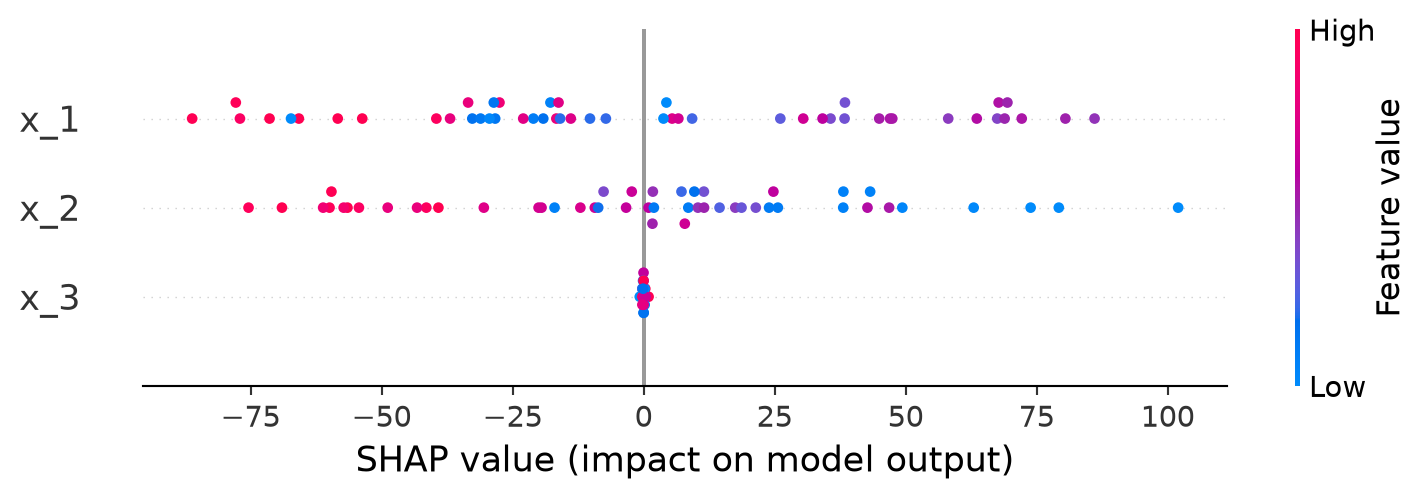
### Shapley Plots
```{python}
shap_explanations = shap_importance(
    predictor=model,
    experiments=experiments,
    bg_experiments=experiments,   # background for KernelSHAP
    bg_sample_size=50,
    seed=42,
)

exp = shap_explanations['y']
shap.summary_plot(exp.values, exp.data, feature_names=exp.feature_names)
```