import bofire.strategies.api as strategies
from bofire.data_models.api import Domain, Inputs
from bofire.data_models.features.api import ContinuousInput
from bofire.data_models.strategies.api import DoEStrategy
from bofire.data_models.strategies.doe import DOptimalityCriterion
from bofire.utils.doe import get_confounding_matrixDesign with explicit Formula
This tutorial notebook shows how to setup a D-optimal design with BoFire while providing an explicit formula and not just one of the four available keywords linear, linear-and-interaction, linear-and-quadratic, fully-quadratic.
Make sure that cyipoptis installed. The recommend way is the installation via conda conda install -c conda-forge cyipopt.
Imports
Setup of the problem
input_features = Inputs(
features=[
ContinuousInput(key="a", bounds=(0, 5)),
ContinuousInput(key="b", bounds=(40, 800)),
ContinuousInput(key="c", bounds=(80, 180)),
ContinuousInput(key="d", bounds=(200, 800)),
],
)
domain = Domain(inputs=input_features)Definition of the formula for which the optimal points should be found
model_type = "a + {a**2} + b + c + d + a:b + a:c + a:d + b:c + b:d + c:d"
model_type'a + {a**2} + b + c + d + a:b + a:c + a:d + b:c + b:d + c:d'
Find D-optimal Design
data_model = DoEStrategy(
domain=domain,
criterion=DOptimalityCriterion(formula=model_type),
ipopt_options={"max_iter": 100, "print_level": 0},
)
strategy = strategies.map(data_model=data_model)
design = strategy.ask(17)
design| a | b | c | d | |
|---|---|---|---|---|
| 0 | 5.000000 | 248.184686 | 80.0 | 200.000000 |
| 1 | 0.000000 | 800.000000 | 80.0 | 200.000000 |
| 2 | 0.000000 | 40.000000 | 180.0 | 200.000000 |
| 3 | 0.000000 | 40.000000 | 80.0 | 800.000000 |
| 4 | 5.000000 | 40.000000 | 80.0 | 200.000000 |
| 5 | 0.000000 | 40.000000 | 80.0 | 200.000000 |
| 6 | 0.000000 | 40.000000 | 180.0 | 800.000000 |
| 7 | 5.000000 | 800.000000 | 180.0 | 200.000000 |
| 8 | 5.000000 | 40.000000 | 180.0 | 200.000000 |
| 9 | 0.000000 | 800.000000 | 180.0 | 200.000000 |
| 10 | 0.000000 | 800.000000 | 80.0 | 800.000000 |
| 11 | 5.000000 | 40.000000 | 80.0 | 800.000000 |
| 12 | 5.000000 | 800.000000 | 80.0 | 800.000000 |
| 13 | 1.201050 | 676.137356 | 80.0 | 227.094242 |
| 14 | 1.717641 | 800.000000 | 180.0 | 485.939841 |
| 15 | 5.000000 | 74.523630 | 180.0 | 800.000000 |
| 16 | 5.000000 | 800.000000 | 180.0 | 800.000000 |
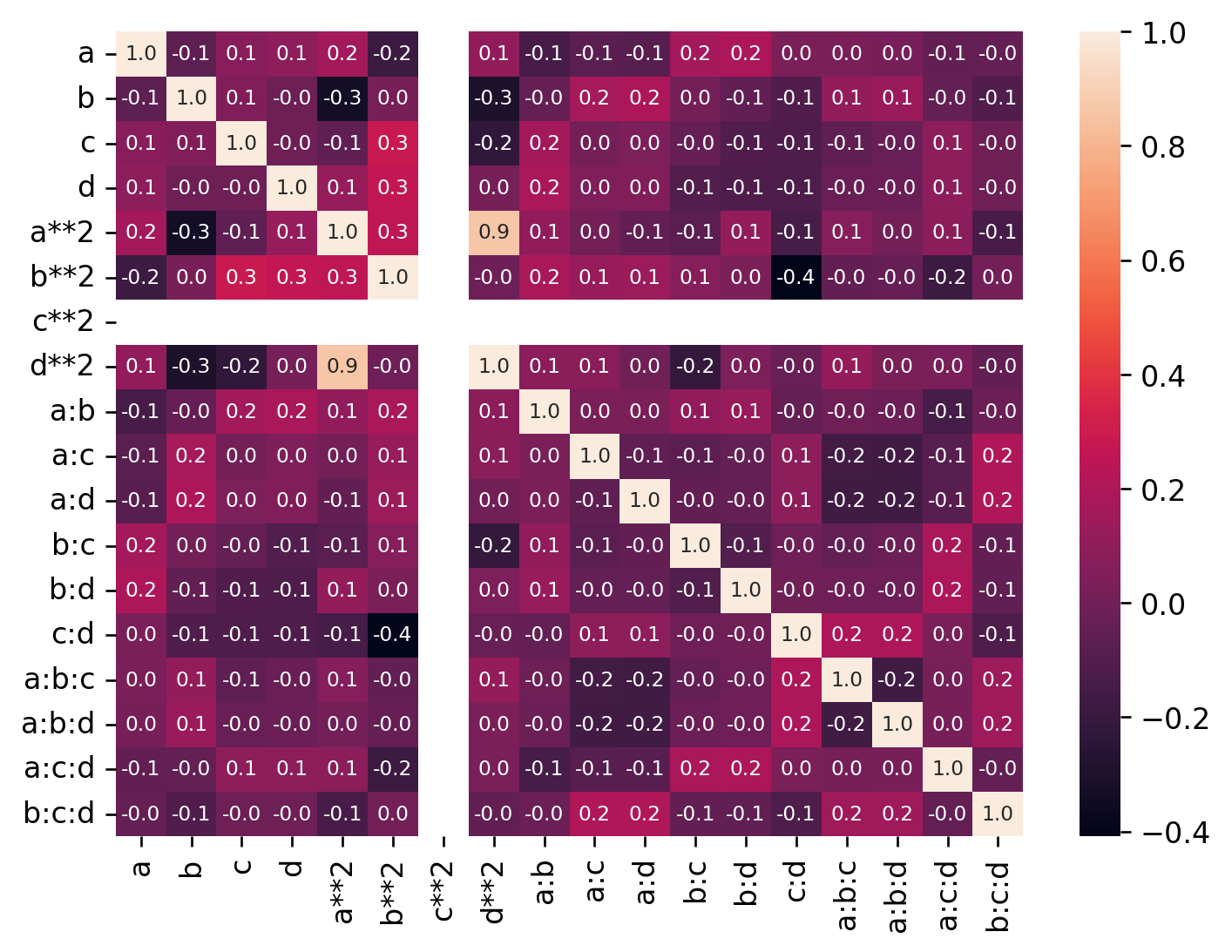
Analyze Confounding
import matplotlib
import matplotlib.pyplot as plt
import seaborn as sns
matplotlib.rcParams["figure.dpi"] = 120
m = get_confounding_matrix(
domain.inputs,
design=design,
interactions=[2, 3],
powers=[2],
)
sns.heatmap(m, annot=True, annot_kws={"fontsize": 7}, fmt="2.1f")
plt.show()